
스마트시대
1-3.Reusable Widgets 와 Cards 본문
728x90
import 'package:flutter/material.dart';
import 'package:toonflix/widgets/button.dart';

void main() {
  runApp(const App());
}

class App extends StatelessWidget {
  const App({super.key});

  @override
  Widget build(BuildContext context) {
    return MaterialApp(
      home: Scaffold(
        backgroundColor: const Color(0xFF181818),
        body: Padding(
          padding: const EdgeInsets.symmetric(
            horizontal: 20,
          ),
          child: Column(
            crossAxisAlignment: CrossAxisAlignment.start,
            children: [
              const SizedBox(
                height: 80,
              ),
              Row(
                mainAxisAlignment: MainAxisAlignment.end,
                children: [
                  Column(
                    crossAxisAlignment: CrossAxisAlignment.end,
                    children: [
                      const Text(
                        'Hey, Selena',
                        style: TextStyle(
                            color: Colors.white,
                            fontSize: 30,
                            fontWeight: FontWeight.w600),
                      ),
                      Text(
                        'Welcome back',
                        style: TextStyle(
                          color: Colors.white.withOpacity(0.8),
                          fontSize: 15,
                        ),
                      ),
                    ],
                  ),
                ],
              ),
              const SizedBox(
                height: 120,
              ),
              Text(
                'Total Balance',
                style: TextStyle(
                  fontSize: 22,
                  color: Colors.white.withOpacity(0.8),
                ),
              ),
              const SizedBox(
                height: 5,
              ),
              const Text(
                '\$5 194 482',
                style: TextStyle(
                  fontSize: 48,
                  fontWeight: FontWeight.w600,
                  color: Colors.white,
                ),
              ),
              const SizedBox(
                height: 30,
              ),
              //여기서부터
              Row(
                mainAxisAlignment: MainAxisAlignment.spaceBetween,
                children: const [
                  Button(
                    text: 'Transfer',
                    bgcolor: Color(0xFFF1B33B),
                    TextColor: Colors.black,
                  ),
                  Button(
                    text: 'Request',
                    bgcolor: Color(0xFF1F2123),
                    TextColor: Colors.white,
                 //여기서까지
                  ),
                ],
              ),
            ],
          ),
        ),
      ),
    );
  }
}

class MyButton extends StatelessWidget {
  const MyButton({
    super.key,
  });

  @override
  Widget build(BuildContext context) {
    return const mybutton();
  }
}

class mybutton extends StatelessWidget {
  const mybutton({
    super.key,
  });

  @override
  Widget build(BuildContext context) {
    return Container(
      decoration: BoxDecoration(
        color: const Color(0xFF1F2123),
        borderRadius: BorderRadius.circular(45),
      ),
      child: const Padding(
        padding: EdgeInsets.symmetric(
          vertical: 20,
          horizontal: 50,
        ),
        child: Text(
          'Request',
          style: TextStyle(
            color: Colors.white,
            fontSize: 22,
          ),
        ),
      ),
    );
  }
}
button.dart
import 'package:flutter/material.dart';
class Button extends StatelessWidget {
final String text;
final Color bgcolor;
final Color TextColor;
const Button(
{super.key,
required this.text,
required this.bgcolor,
required this.TextColor});
@override
Widget build(BuildContext context) {
// TODO: implement build
return Container(
decoration: BoxDecoration(
color: bgcolor,
borderRadius: BorderRadius.circular(45),
),
child: Padding(
padding: const EdgeInsets.symmetric(
vertical: 20,
horizontal: 50,
),
child: Text(
text,
style: TextStyle(
color: TextColor,
fontSize: 22,
),
),
),
);
}
}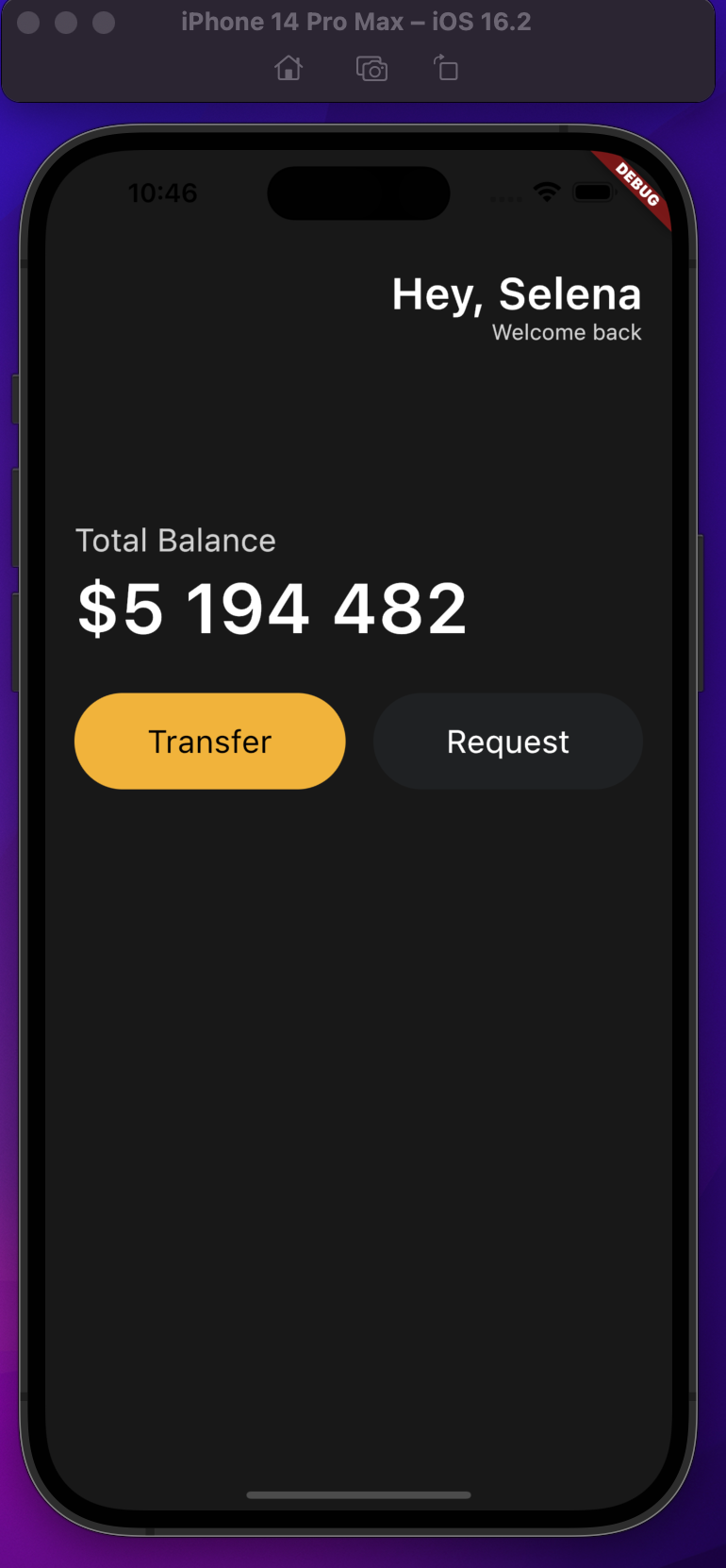
중요 포인트: row, column에서는 axis가 서로 반대이다.
row에는 main axis(축), cross axis가 있다.
main axis는 가로축
cross axis는 세로축이다.
Column에서는
main axis는 세로축
cross axis는 가로축이다.
import 'package:flutter/material.dart';
import 'package:toonflix/widgets/button.dart';

void main() {
  runApp(const App());
}

class App extends StatelessWidget {
  const App({super.key});

  @override
  Widget build(BuildContext context) {
    return MaterialApp(
      home: Scaffold(
        backgroundColor: const Color(0xFF181818),
        body: Padding(
          padding: const EdgeInsets.symmetric(
            horizontal: 20,
          ),
          child: Column(
            crossAxisAlignment: CrossAxisAlignment.start,
            children: [
              const SizedBox(
                height: 80,
              ),
              Row(
                mainAxisAlignment: MainAxisAlignment.end,
                children: [
                  Column(
                    crossAxisAlignment: CrossAxisAlignment.end,
                    children: [
                      const Text(
                        'Hey, Selena',
                        style: TextStyle(
                            color: Colors.white,
                            fontSize: 30,
                            fontWeight: FontWeight.w600),
                      ),
                      Text(
                        'Welcome back',
                        style: TextStyle(
                          color: Colors.white.withOpacity(0.8),
                          fontSize: 15,
                        ),
                      ),
                    ],
                  ),
                ],
              ),
              const SizedBox(
                height: 120,
              ),
              Text(
                'Total Balance',
                style: TextStyle(
                  fontSize: 22,
                  color: Colors.white.withOpacity(0.8),
                ),
              ),
              const SizedBox(
                height: 5,
              ),
              const Text(
                '\$5 194 482',
                style: TextStyle(
                  fontSize: 48,
                  fontWeight: FontWeight.w600,
                  color: Colors.white,
                ),
              ),
              const SizedBox(
                height: 30,
              ),
              // 여기서
              Row(
                mainAxisAlignment: MainAxisAlignment.spaceBetween,
                children: const [
                  Button(
                    text: 'Transfer',
                    bgcolor: Color(0xFFF1B33B),
                    TextColor: Colors.black,
                  ),
                  Button(
                    text: 'Request',
                    bgcolor: Color(0xFF1F2123),
                    TextColor: Colors.white,
                  ),
                ],
              ),
              const SizedBox(
                height: 100,
              ),
              Row(
                crossAxisAlignment: CrossAxisAlignment.end,
                mainAxisAlignment: MainAxisAlignment.spaceBetween,
                children: [
                  const Text(
                    'Wallets',
                    style: TextStyle(
                      color: Colors.white,
                      fontSize: 36,
                      fontWeight: FontWeight.w600,
                    ),
                  ),
                  Text(
                    'View All',
                    style: TextStyle(
                        color: Colors.white.withOpacity(0.6),
                        fontSize: 18,
                        fontWeight: FontWeight.w600),
                  ),
                ],
              ),
              const SizedBox(
                height: 20,
              ),
              Container(
                decoration: BoxDecoration(
                  color: const Color(0xFF1F2123),
                  borderRadius: BorderRadius.circular(25),
                ),
                child: Padding(
                  padding: const EdgeInsets.all(
                    30,
                  ),
                  child: Row(
                    children: [
                      Column(
                        crossAxisAlignment: CrossAxisAlignment.start,
                        children: [
                          const Text(
                            'Euro',
                            style: TextStyle(
                              color: Colors.white,
                              fontSize: 30,
                              fontWeight: FontWeight.w600,
                            ),
                          ),
                          const SizedBox(height: 10),
                          Row(
                            children: [
                              const Text(
                                '6 428',
                                style: TextStyle(
                                  color: Colors.white,
                                  fontSize: 20,
                                ),
                              ),
                              const SizedBox(
                                width: 5,
                              ),
                              Text(
                                'EUR',
                                style: TextStyle(
                                    color: Colors.white.withOpacity(0.8),
                                    fontSize: 20),
                              ),
                            ],
                          ),
                        ],
                      ),
                    ],
                  ),
                ),
              ),
            ],
          ),
        ),
      ),
    );
  }
}

class MyButton extends StatelessWidget {
  const MyButton({
    super.key,
  });

  @override
  Widget build(BuildContext context) {
    return const mybutton();
  }
}

class mybutton extends StatelessWidget {
  const mybutton({
    super.key,
  });

  @override
  Widget build(BuildContext context) {
    return Container(
      decoration: BoxDecoration(
        color: const Color(0xFF1F2123),
        borderRadius: BorderRadius.circular(45),
      ),
      child: const Padding(
        padding: EdgeInsets.symmetric(
          vertical: 20,
          horizontal: 50,
        ),
        child: Text(
          'Request',
          style: TextStyle(
            color: Colors.white,
            fontSize: 22,
          ),
        ),
      ),
    );
  }
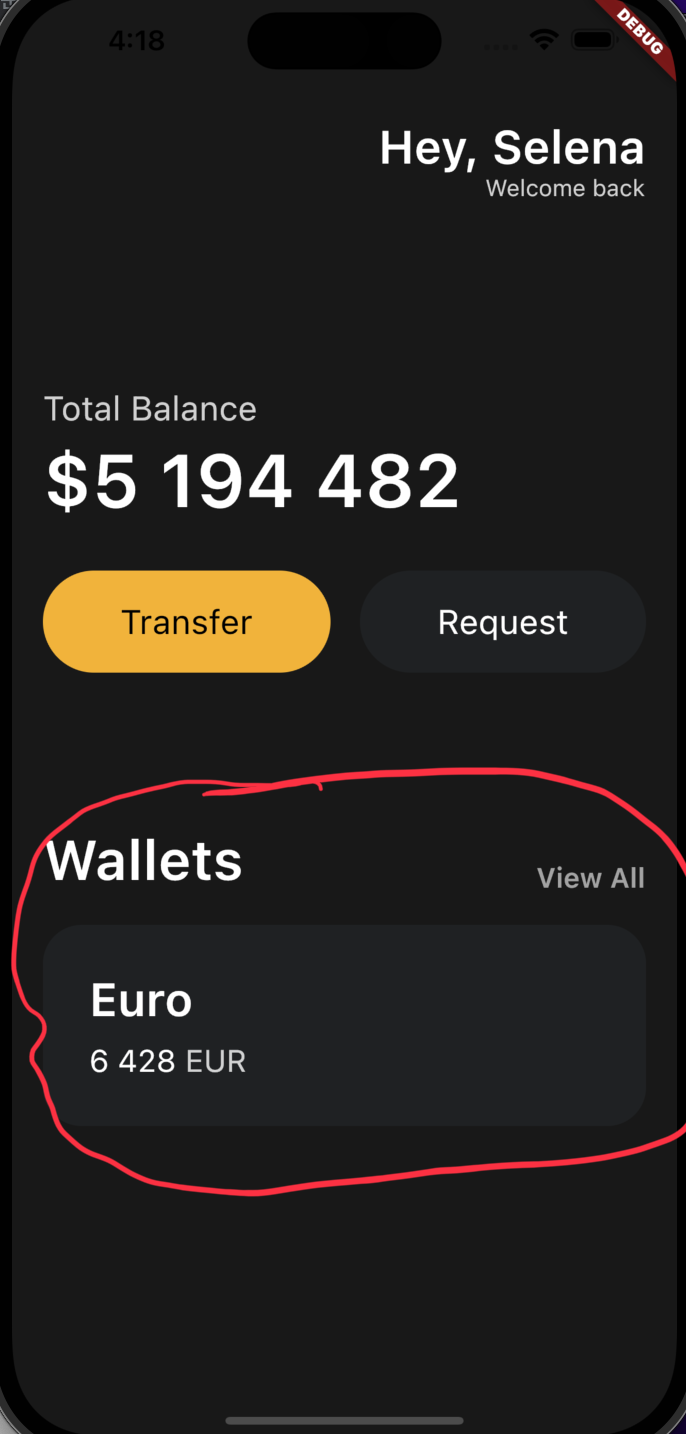
}
728x90
반응형
'Programing > Flutter' 카테고리의 다른 글
| 2-1.state (0) | 2023.03.31 |
|---|---|
| Custom currency widget(currency_card.dart)안에서 offset 관련 parameter 넣기 (0) | 2023.03.28 |
| 1-4.icons and transforms, Reuseable cards (0) | 2023.03.26 |
| 1-2.header (0) | 2023.03.18 |
| 1-1.Hello world build (0) | 2023.03.13 |
'Programing/Flutter' Related Articles
more


Comments